
Settings
every option and its default.
Mail Desk > Settings needs the Settings permission. Every option has a safe default, so you can start without changing anything.
01Sync
The page has four cards (Sync, Team, Convert to lead or ticket, Attachments) and the AI assistant card below them. Save settings at the bottom saves all of them. Numbers outside the range are set to the nearest allowed value.
| Option (as labelled) | Default | Range | What it does |
|---|---|---|---|
| Import the last N days | 30 | 0 – 3650 | "Default for new mailboxes." Each mailbox keeps its own value (First import). 0 = all mail. |
| Messages per cron run and mailbox | 50 | 1 – 500 | How many messages one sync reads from a mailbox (Inbox and Sent together). "Large first imports continue on the next runs." |
| Max message (MB) | 25 | 1 – 200 | Larger received messages are stored with headers only. Also the most all attachments of a message you send may weigh together. |
| Max attachment (MB) | 15 | 1 – 200 | Larger received attachments are not stored, only listed. |
| Max upload (MB) | 10 | 1 – 100 | The most one file you attach to a message may weigh. Your PHP upload limit (upload_max_filesize, post_max_size) must allow it too. |
The card's header shows "Last cron run time ago" (green) or "The Perfex cron has not run Mail Desk yet", and its footer reminds you to run the Perfex cron every 5 minutes.
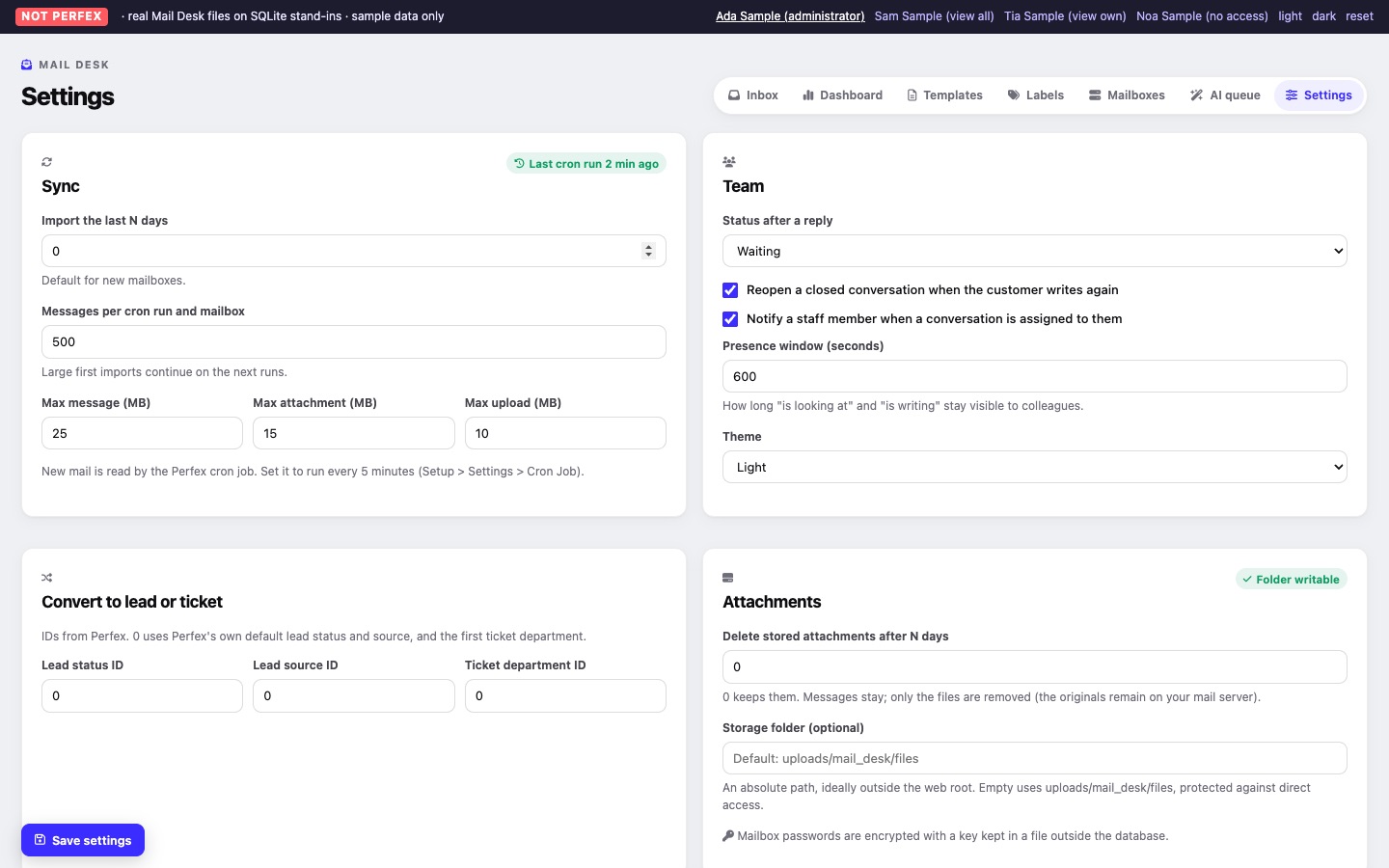
02Team
| Option (as labelled) | Default | What it does |
|---|---|---|
| Status after a reply | Waiting | The status a conversation gets after someone sends a reply from Mail Desk: Waiting (for the other side) or Closed. Open leaves the status as it is. |
| Reopen a closed conversation when the customer writes again | On | A waiting or closed conversation becomes Open when the other side writes again. |
| Notify a staff member when a conversation is assigned to them | On | The assignee gets a Perfex notification. |
| Presence window (seconds) | 90 | 20 – 600. How long "is looking at" and "is writing" stay visible to colleagues after their browser last reported in. |
| Theme | Light | Light, Dark, or Follow the browser. Applies to Mail Desk's pages and the customer Emails tab. |
03Convert to lead or ticket
"IDs from Perfex. 0 uses Perfex's own default lead status and source, and the first ticket department." Type the numeric ID you see in Perfex (for example in the address bar when you edit a lead status).
| Option (as labelled) | Default | What it does |
|---|---|---|
| Lead status ID | 0 | Status of leads created from e-mail. 0: Perfex's default lead status. |
| Lead source ID | 0 | Source of leads created from e-mail. 0: Perfex's default lead source. |
| Ticket department ID | 0 | Department of tickets created from e-mail. 0: the first department in Perfex. Without any department, tickets cannot be created. |
04Attachments
The card's header says Folder writable or Folder not writable.
| Option (as labelled) | Default | What it does |
|---|---|---|
| Delete stored attachments after N days | 0 | 0 – 3650. "0 keeps them." Otherwise the daily clean-up deletes stored attachment files older than this; messages stay, and the originals remain on your mail server. |
| Storage folder (optional) | Empty: uploads/mail_desk/files | An absolute path, ideally outside the web root, for example /home/account/mail-desk-files. A relative path or one containing .. is not saved. The folder must exist and be writable by PHP; if it is not, Mail Desk keeps using the default folder. |
A line under the fields says where the encryption key for mailbox passwords is kept: in a file outside the database (normal) or, when the uploads folder was not writable at activation, as a Perfex option.
Mail Desk does not move existing files. Copy the contents of the old folder to the new one yourself (keep the sub-folders), otherwise older attachments show as removed.
05AI assistant
All AI options are explained on Optional AI. AI is off by default.
| Option (as labelled) | Default |
|---|---|
| Switch on the AI assistant | Off |
| Provider | Anthropic Claude |
| Model | Empty: you enter the model name |
| API key | Empty (write-only; Remove the stored key appears once a key is saved) |
| Address (Ollama and OpenAI-compatible only) | Empty |
| Requests per month (whole install) | 500 (0 = no limit) |
| Requests per staff member per day | 30 (0 = no limit) |
| Tone for all mailboxes | Empty |
| Apply suggested labels without approval | Off |
| Apply suggested priority without approval | Off |
Test the AI connection at the bottom of the card tests the saved settings (it counts as one request).